![stat-combo-color-horiz updated-1.png]](https://help.stat.io/hs-fs/hubfs/stat-combo-color-horiz%20updated-1.png?height=40&name=stat-combo-color-horiz%20updated-1.png)
Minimum Internet Speeds
At least 30 Mbps download and 10 Mbps upload. Faster is better for a smoother experience.
Note: if your provider lists speeds in MB/s, that’s roughly 3.75 MB/s down and 1.25 MB/s up.
Setup Tips
-
Wired backhaul: Whenever possible, connect APs by Ethernet (avoid mesh for core coverage).
-
Placement: Spread APs so tablets see a consistently strong signal (target ~–65 dBm).
-
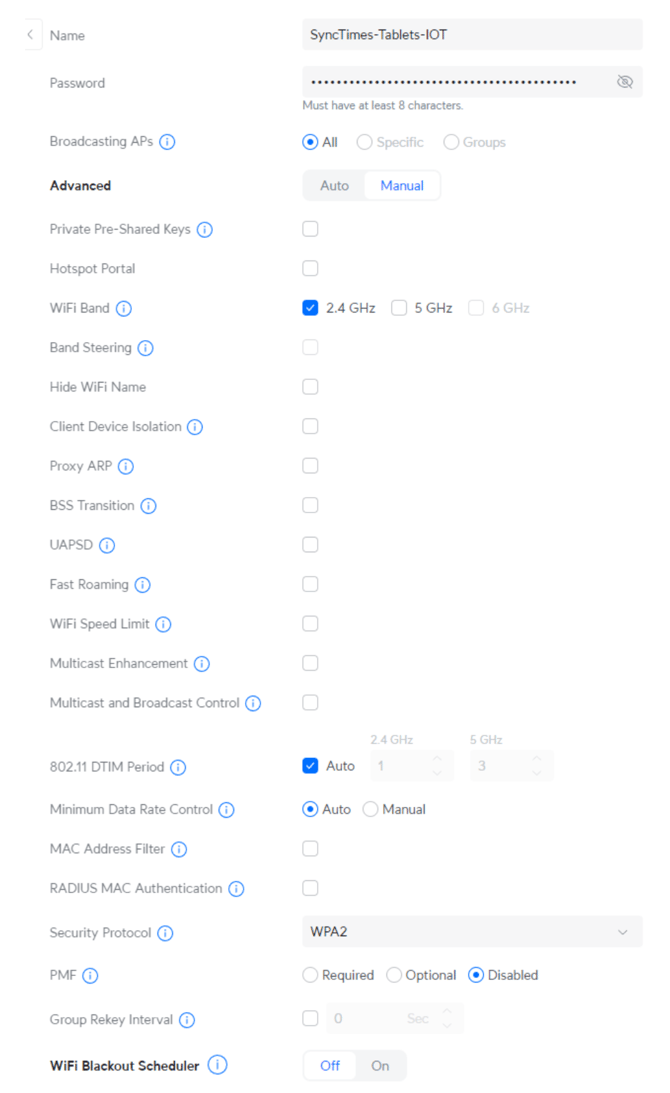
Keep it simple: One SSID, WPA2 password, no advanced features or complex policies.
Access Point Planning
For ~30 tablets:-
2–3 Access Points (APs) total
-
Channels: Set each AP to a different non-overlapping 2.4 GHz channel: 1, 6, or 11
-
Client load: Plan for 15–20 tablets per AP (max)
Tablet Settings
-
Band: 2.4 GHz only (required by the tablets)
-
Security: WPA2-PSK (AES)
-
SSID: Use one SSID for all Stat tablets
-
Enhancements: Turn off network “optimization” features. Keep it simple; avoid things like band steering, client steering, or auto-optimization toggles.
-
Legacy rates: Leave legacy rates ON (do not disable slower data rates)
Below is a screenshot of typical settings to follow: